After fixing my computer that lagging and cpu usage up and down, I noticed that view inside Windows Explorer got changed. The difference clearly noticeable especially on 'Computer' folder. Usually the folder shows the amount of free space of each partition. But it's gone. Turns out the problem is the folder view mode is no longer 'Tile' view as usual, but it changed to 'Extended Tile' view and 'Tile' view option was missing.
I like the 'Tile' view since I can monitor free space on the hard drive easily by displaying graphs, especially which partition contains less or more data. My initial attempt to bring back the 'Tile' view is 'Restore Defaults' at every tab under Folder and search options. Still, the 'Tile' view didn't show up.
Solution
Finally I found a very easy solution on SevenForums.com. Go to this page, download the number "1. To Restore Default Folder Templates for All Folders". It was a bat file, then run it. Immediately after the bat finished running, I checked the view option inside Windows Explorer and voila! The 'Tile' view successfully restored. Read More...
Yesterday, my lovely computer running on Windows 7 acted very strange. I noticed that hard drive led indicator turns on and off in persistently since booting. I felt there must be something wrong. After the desktop completely loaded, longer time than usual, the effect became more clear. Mouse move, page scrolling was lagging. My first assumption, it was infected by virus. So I scan with installed AVG antivirus and Windows Defender. The scanning itself took a really long time, and no virus found.
My assumption then changed. If the two antivirus found nothing, the problem must be something else, it could be a hardware issue :( As usual, to identify any problem, I went to Event Viewer. In the Event Logs - System, there were hundreds of error messages saying "The device, \Device\Harddisk0\DR0, has a bad block." OMG and bingo!
Immediately I ran scandisk for all partition in the hard drive and restart the computer. Scandisk usually will solve "light" hard drive errors. Unfortunately, even after scanning twice, I was not lucky. The problem was intact.
Solution
So, Google help me finding some forum with people having some problem. It seems likely that my hard disk got bad sector or similar. People in a forum suggest to scan with hard disk diagnostic tool, provided by hard disk manufacture. Since my hard disk is Seagate ST3500418AS, so the diagnostic tool must be available in Seagate web page. Short story, Seagate has a diagnostic tool called SeaTools. For Windows, there are two versions; DOS mode and Windows mode. The tool is packed in bootable CD image, so you need to burn it to blank CD. Since I didn't have any blank CD, luckily I found a way to install SeaTools to USB flash drive.
Google "install seatools on usb" to find a bundle of SeaTools image and utility to make a bootable USB. The instruction how to install SeaTools on USB usually available at the web sharing it.
Short story (again), before running SeaTools from the USB, I have to make backup of the broken hard drive just in case SeaTools can cause data lost. Although I didn't backup all the data, the backup process took a half day with hard disk in such condition. I also suggest you strongly to make backup of your data first.
After backup, it's time for SeaTools to work. Insert the bootable USB drive, SeaTools will loading, select the target drive and do Basic test. If basic test fail, go with Long test. On my 500 GB drive, it took around one and half hour to complete scanning and 2 errors found. The repairing process itself ran "semi automatically", just click repair, Ok, etc. After finally the scanning and repairing finished, I restarted the computer, and the problem had gone. yay!
TL;DR
CPU usage up and down, computer lagging it turns out a hard drive problem. Install a hard drive diagnostic tool to USB drive, make backup of data, run the diagnostic tool. Problem solved. Read More...
I always wonder what is my computer doing when it takes long time to shut down? Incidentally I found a brief good explanation on reddit.
Just in case you're too lazy to click the link, I copied down the answer here:
The computer does many things when you shut down. This post is going to cover as many as I can think of.
One of the simplest and most important has to do with memory. The computer has to insure that anything that needs to be written to disk, is written to disk. If you don't do this, you could end up with corrupt or invalid files. If you want more detail than that, you're going to have to take a few years of computer science at a college level. Read More...
After all this time can only be enjoyed by IOS device users, photo editing and sharing application Instagram finally available for Android devices, on Tuesday (03/04/2012).
Instagram allows users to capture images and edit them, using filters gives impression of retro and unique. After that, the image can be shared to social networks; Twitter, Facebook, and Foursquare. Read More...
Yesterday I tried to install a video editing software, Sony Vegas Pro 11 on my Windows 7 32-bit SP1 computer. After trying hours, it won't install. The problem is the installation always got stuck on "Please wait for initial configuration of Vegas Pro 11.0. This might take a few moments". I looked at task manager, the process was completely idle. I even downloaded Sony Vegas Pro 10 and it's the same.
Yesterday a friend ask me to reinstall his computer. Unfortunately what he has was only Windows XP SP1 OS. After reformatting and installing the OS successfully, I need to install a free antivirus. It took time to find out a free antivirus supports XP SP1. First I download AVG, install, no success. Second one is Avira Antivir. It only supports XP SP4.
After digging online, I found that Avast antivirus supports Windows XP SP1. I downloaded it, install and it run smoothly. You just need to register the free Avast to get free key in order to be able update its virus database frequently. It could be a reason behind why Avast rank #2 on Cnet's most popular downloads.
Read More...
Adobe Photoshop has a feature to save an image for web display and transfer called Save for Web also known as Save for Web and Device on newer version. Besides, other feature is Batch for automation process. The problem is, how to combine those two features? How to run save for web in batch? On other words, how to run save for web for multiple images at a time? Read More...
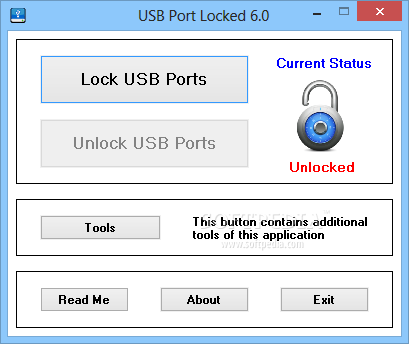
Frequent problems caused by user or malicious software, it seems quite apprehensive. No wonder if the various data protection can be found nowadays, ranging from applications access protection to hardware protection. One of becoming popular hardware protection is the USB port protection.
Making changes to files stored on removable USB media or better known with USB flash drives are usually easy to do without a complicated process because the user can directly browse the files through Windows Explorer. This convenience is what offered by the Explorer iPhone application to iPhone users.
Doing backups is important, especially that no one can tell us what will happen in the future. These conditions seem to be quite alarming for everyone, especially gaming fans, because we do not want to repeat the game to the earlier level.
Selecting a DNS (Domain Name Server) that perform well are very important for the stability and speed of internet access to a site. And of course, this is a 'hard' process especially for newbie. Ever wondering how to benchmark a DNS speed easily? Various software can be a quick solution for the user, one of which can be selected is a freeware called DNS Benchmark.
Are you looking for registry cleaner product information? If the answer is yes, you have come to the right place now, because this article will introduced you with Regwork.com. This site will help your PC improved from poor PC performance. Well, just an information for you; there are many hidden corrupt files plus over than 150 hidden errors and bugs in your PC. There is a research tell that more than 94% PC have this problem. This problem will makes your PC get poor performance, your screen pop up with Windows error messages and you frequently experience system freezes and blue screen. Each PC has different experience, but some people ever say that their PC also bogged down with invalid or empty registries. If your PC switching and turning off act taking a very long time to process and you have the entire problems above, your PC is in dangerous. What I can say about your personal computer problems is your Windows registry becomes saturates with redundant files over time. It also added with broken links that makes some errors and even system crashes inside your PC.
You really need your system registry cleaned as soon as possible. If you want to heal your computer, you need to buy a new registry cleaner and registry repair software. You need to clean it up because your registry system is one of the most vital components in your PC. Fixing your registry is not an easy task. You need special knowledge to fix your computer. That’s why you need professional registry cleaner to undertaken this job. If you try to do it manually, perhaps you will cause a permanent and irreparable error in your PC and you will lose all of your important data because it will need a complete format after. As we all knew, system registry holds a lot of information about your computer setup and configuration. If you uninstall data or delete a program, your registry system still keeps a reference of the deleted file and doesn’t remove it yet. That’s why an error will stays in you registry.
Then, the registry gets filled with those errors and invalid data. You will see your computer system will become lethargic and very slow and then you will meet malfunction and system crash plus hang. Well, the best step you should do is don’t make a mistake, little mistake can harm your computer ever. But don’t get frustration now! Thanks to computer improved technology because you can use customized software to clean registry. This is a solution that can safely detect the entire registry errors and repair them automatically. In this time, you have to use Regwork because RegWork can scan your entire Windows registry for all errors and invalid data within minutes. Then you can use registry editor then choose to clean up selected errors and repair all of your data and programs. For protection purposes, Regwork offers a backup feature for all repaired files for easy recovery. If you want to download Regwork, you can go to the official site now. Read More...
Having some problems with your computer machine that it getting much slower that it used to be? Do your old devices are unable to properly connect to the system? Well, if it’s not the virus’ work, then it might be your drivers outdated. We all know that driver always need to be updated regularly, just to keep it following the new improvements been made by the manufacturer, especially if your devices are the old ones. However as since that there should be hundreds of drivers are published in every product’s brand, with some series and types to be matched, this sometimes will spend lots of you time though.
But now a nice solution for such problems is appeared. Instead of getting through all the hassles and time wasting defining the best driver update for your system, now you can find the exactly needed updates just in few clicks of your finger, and this solution is called Driver Access. This is new developed system maintenance software, which focused in maintaining driver update management for all your devices, hardware, and others, and intended to offer the simple and easy way of finding the needed updates for all your computer’s drivers. The software will do the whole things for you, while you may only need in less than 5 minutes to get all problems away from your system.
Once you get it installed to your computer and run the program, it will automatically to scan the entire drivers’ condition, and check whether there are missing updates. And if it so, the software will then automatically to browse through the internet to find you the best suited update to download. There will be more time wasting of browsing through the drivers’ lists from the manufacturers’ website; the software will get driver download processes done in fast and easy way. With the simple operation and easy to understand features, even there is no need to be a computer nerd just to get the needed drivers and get your computer to its maximum performance.
There are millions of drivers are associated with the software, which it ranged in almost all important computer sectors, such as sound driver, motherboard driver, Bluetooth drivers, chipset drivers, and many others. And also references of computer compatible devices drivers to ensure your convenience in multitasking. If you find that your printer device or speakers isn’t recognized by the system, then just simply to run the program, and the problems will be solved just in 5 minutes, so you can get into the work in sooner without any need to wait any longer.
Driver Access is all what you need for your immediate driver update assistance. There will be no more stressing moments of dealing with the slower system run or unable to connect your devices with the system, these all can be solved with this software though. Find out the testimonials from people whom ever experiencing the software at DriverAccess.com, and here you can also get the detailed information about the product, along with the purchasing procedures to be through as you might interested to have it. Read More...
The data inside the hard disk has already filled up that there is no more space left to save the new movie from the internet. We do need to get rid of the data, but it is too worthy to be deleted. Moreover, there are movies that we haven’t watched yet and there are also songs from our favorite singers. What should we so now?
The best solution is by finding alternative storage for the data. We can burn the data into discs. But we need high quality disc which means without any doubts we need to get the discs from Verbatim. It is because this brand is the guarantee of high quality discs as the manufacturer has received the ISO Certification. Now, we have already made a choice for the discs, it means it is time for us to start burning the data. Let’s starts with the movies. Since each movie has big sizes, we’d better store the movies in Verbatim DVD-R which has the capacity up to 4.7GB. For the music and song, we should make an mp3 compilation. Verbatim CD-R will become the best media for it. Moreover, it has a printable surface that we can create our own cover for the mp3.
Gotmedia.com has collection for the discs and there are some which are for sale. There is a new portable storage media available at Verbatim.com. Visit the website for further information.
Read More...
Computer is one thing that is easily found now. Once people go to official place they will find computer there. Actually, this stuff is not only can be found in formal places, it can also be found in informal places. Computer does really can be found anywhere. There will be many computers found in schools, hospitals, offices, hotels, factories, etc. Nowadays, computer is one thing that cannot be separated from people since it is helpful enough in helping people doing many things.
Dealing with computer, another thing that people need to know is computer spy. For those who have not been familiar with this term, what they need to do is checking Brickhousesecurity.com. This website will give more explanations about what computer spy actually is to the visitors of this website. There are three steps how to use it that are provided in this website. Bt visiting thus website, people will be able to know about the spesifications and about the features of this product.
Though Mozilla Firefox is quit fast browser, with lapse of time you'll find it starts working much slowly, especially on old pc. One factor makes it so is fragmentation of profile databases including bookmark, password, history, etc. The solution is to use SpeedyFox to compact the databases without worrying about data loss. It means, SpeedyFox won't speed up your internet connection but it will speed up your slow Firefox browser.
Publisher of this useful tool claimed that SpeedyFox is abel to boost Firefox startup up to 3 times, speed up browsing history, cookies quicker operation etc. Read More...
Generally, we are only able to run bootable CD or DVD from its original media. You cannot just copy the installation files to USB flash drive and run them from the USB drive since bootable CD or live CD contains additional boot loader, different from non bootable CD. Then, here is a program that will let you copy bootable CD and DVD to USB flash drive, USB stick, HDD etc. It means, you can install Windows from the portable media to your computer or netbook. Of course it will certainly facilitate the installation process to netbook since most of netbook not equipped with optical drive. Read More...
Every time you plug a usb drive into pc or notebook, it will run an autoplay or autorun that scan what kind of files contained in the disk than give you choices on what application should used to open the files.
If you don't like this automatic action, you can disable this autoplay/autorun function.
For non-Home versions of Windows (for example, Windows XP Professional, Vista Ultimate): Read More...
There are a few reasons to know your connected devices' IP addresses. For one, it's invaluable in troubleshooting. After making sure your unresponsive device is actually plugged in, the next step will nearly always be to point your PC's browser at its IP address and make sure that something having to do with the device appears, such as a configuration page, or at least the device name. This leads to another reason: Often, a device's "home page"—what you see in your browser when you type in the device's IP address—will give you easier access to device options, and in some cases, more settings and extras. Read More...
Most times when you need to set up a meeting in Outlook, the process starts with an e-mail you receive. I used to switch to the Calendar and add a new entry, with the date and time, and then paste the e-mail into the new appointment. But there's an easier way: Simply right-click on the original e-mail and choose Move to Folder, select Calendar, and hit OK. This actually creates a new appointment entry, complete with the e-mail inserted in the main window. You still have to enter the date, time, and participants, but you get to that point faster.