Showing posts with label PDF utility. Show all posts

Thursday, January 8, 2009

Automatic Randomize Wallpaper Shifting


Desktop is the display that you see first after logon into a computer to start a job. Desktop wallpaper is one of important part that may influence your mood and affect on the result of your work. An amazing wallpaper picture will not amaze you anymore when you see it everyday for a long time, even that could bring you bored, isn’t it?

Wallpaper Shifter is program to automate wallpaper shifting every time you turn on computer and randomize wallpaper cycling in a defined folder. Usually, to make a picture as desktop background or wallpaper it has to be fit with display aspect ratio, but Cyber-D’s Wallpaper Shifter will handle all images with any aspect ratio image. So if the wallpaper picture doesn’t fit to desktop, Wallpaper Shifter will automatically crop, fit or center wallpaper images. You can also choose background for unfitted picture by default, blur of edge repeat effect. Wallpaper Shifter doesn’t consume a lot of computer resource since it only work once every computer starts.

Download this automatic randomize wallpaper shifter here. (8,11 mb)
Read More...

Friday, August 1, 2008

Create Web Page in PDF format

How to convert a web page to PDF format? You can easily make a PDF format of a web page using a Firefox add-ons. Of course, you need Firefox installed, the PDF download add-ons and internet connection. Its add-ons feature lets you create a PDF file from any web page and send you as attachment in an email. Or, you can choose to save in local drive directly after converting process finish.If you frequently send a web page to your own email for reading later, you may feel this add-ons useful.
It is better to configure the default action for the converting results, whether you want to save directly to local drive or send it by email. First, I try to convert a Google result page by simply click the new toolbar on top right corner. Usually it doesn't take a long time to convert a web page, especially if the page is text only (without picture).
From the feature, it is possible to convert PDF format to HTML and read it on new Firefox tab. But, I found it didn't work. I don't know why.
Read More...

Monday, July 28, 2008

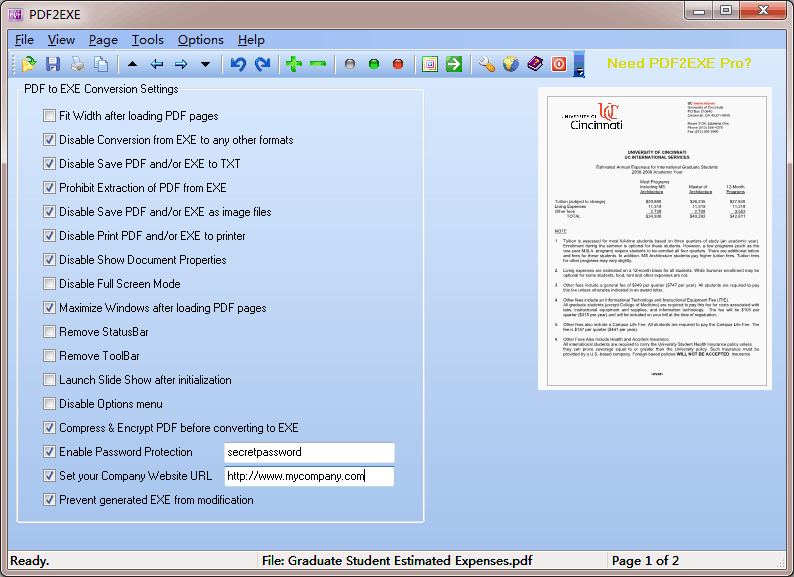
Distribute PDF easier with PDF2EXE

(click to enlarge)
PDF2EXE is a SHAREWARE program to quickly convert PDF to EXE, making PDF readable on any computer without Adobe Reader or Adobe Acrobat software installed. The conversion from PDF to EXE preserves the look and feel of the original document.
  • Compress, encrypt PDF document
  • Set password for the converted EXE file
  • Disable conversion from PDF to TXT, EXE to TXT
  • Disable printing of PDF file
  • Launch slide show after initialization
  • Disable conversion from EXE to image formats
  • Disable document properties
  • Prevent generated EXE from modification
With PDF2EXE, you can distribute your PDF files to your customers, share PDF documents with your friends without worrying about whether they can read it or not. PDF2EXE users can have more control over PDF files.

Distribution Royalties for all the generated EXE files.

Download 15 days free trial Read More...

PDF SpeedUp 1.42 for Adobe Reader

Speed up your Acrobat Reader to being lightning fast!

PDF SpeedUp allows you to significantly speed up the time it takes to load Adobe Reader. If you notice that when the Reader starts it loads many plug-ins which you may or may not need, this program simply disables the plug-ins and loads only the absolute necessary ones so the program starts quickly. It offers several options and you can also manually enable or disable the plug-ins as needed. PDF SpeedUp works with Acrobat versions 3 through 6.xx.

Features:
  • Free PDF Tweak Utility for Adobe Acrobat v3.0 to v5.5, Adobe Reader v6.0, v6.01, v6.02
  • Enable or disable the plug-ins as needed
  • Turn off all Updates features
  • Disable the splash screen during program startup
  • Remove the My eBooks folder created in My Documents
  • Turn off the advertisements for Adobe products in the upper-right corner of the toolbar
  • Remove PrintMe and Adobe Reader icons
  • Disable Browser Integration
  • Disable confirmation dialog when closing Adobe Reader
  • Better speed for LAN and Cable connection
  • Clear Adobe Reader Recent Files History
  • Restore to original settings at any time
Download here 311 kb
Read More...
 

Published by COMPUTER STUFF supported by DVD Writer USB